The Project
F1 Radio Meme is a fun, interactive web application that lets users create and share Formula 1 radio message memes. Users can select any F1 driver, add custom messages between drivers and teams, and instantly generate high-quality square images ready for social media sharing. The app features a modern, responsive design with real-time preview and seamless image export functionality.
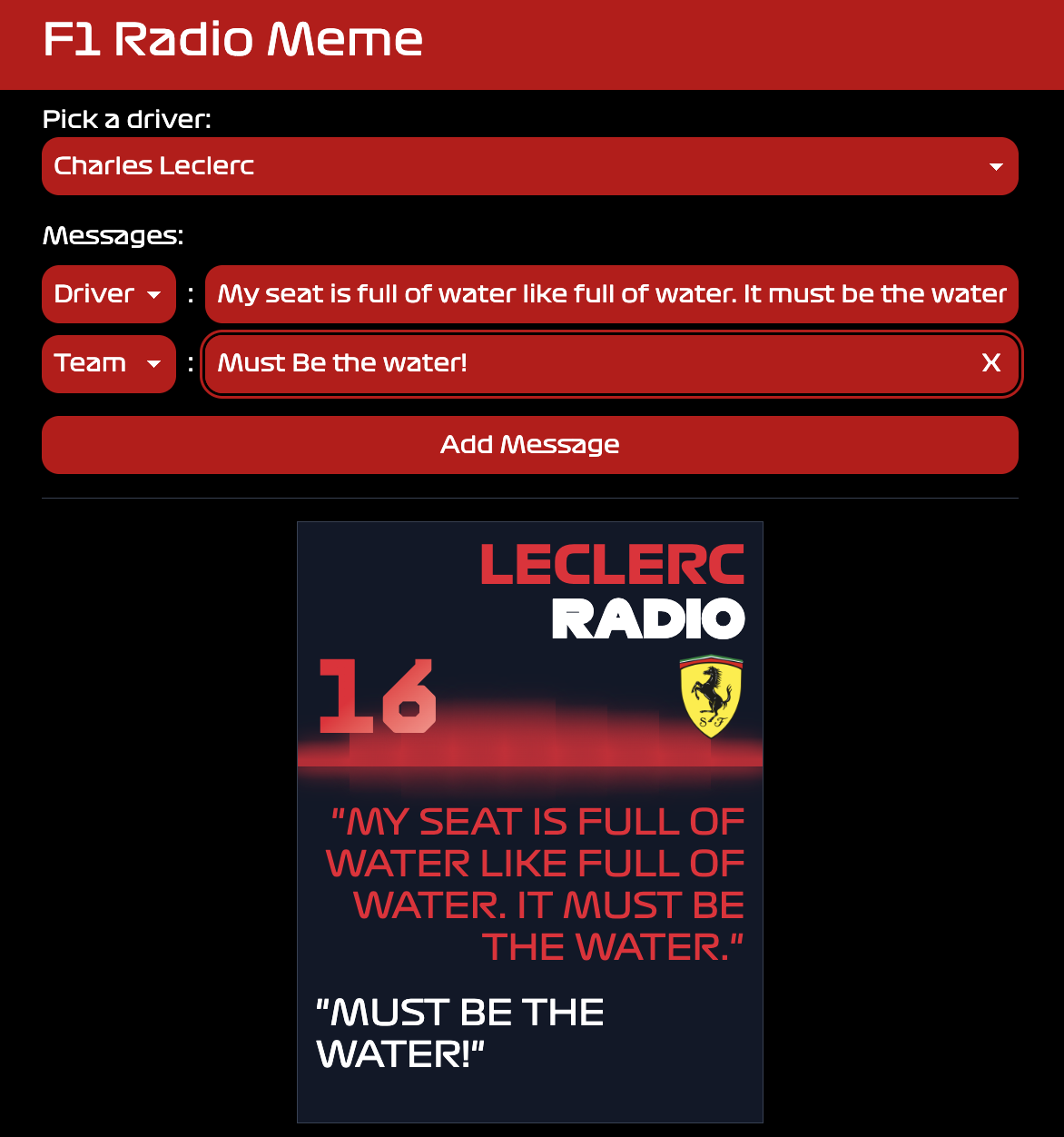
How It Works
User visits site → Selects driver → Adds messages →
Preview updates → Clicks Copy/Download →
High-quality square image generated → Ready to share-
Driver Selection - Choose from current F1 drivers with authentic team branding
-
Message Creation - Add multiple messages alternating between driver and team
-
Live Preview - See the meme update in real-time as you type
-
Image Generation - Generate high-resolution square images (6x scale for maximum quality)
-
Export Options - Copy to clipboard or download directly as PNG
-
Share Ready - Images are perfectly formatted for social media platforms
Key Features
Image Generation
-
✅ High-resolution image export (6x scale factor)
-
✅ Automatic square formatting with background fill
-
✅ PNG format with lossless quality
-
✅ Configurable quality settings (scale, format, quality)
-
✅ DOM-to-image conversion with custom styling
User Experience
-
✅ Real-time preview as you type
-
✅ Intuitive form interface
-
✅ Add/remove messages dynamically
-
✅ Copy to clipboard with one click
-
✅ Direct download option
-
✅ Responsive design for all devices
Technical Features
-
✅ SvelteKit 5 with modern reactivity
-
✅ TypeScript for type safety
-
✅ URL-based state management (shareable links)
-
✅ Internationalization ready (i18n)
-
✅ Optimized build with Vite
-
✅ Server-side rendering for SEO
Technical Architecture
The application is built with SvelteKit, a modern full-stack framework that combines the best of client and server-side rendering. The image generation happens entirely in the browser using DOM-to-image conversion, ensuring fast performance and no server costs for image processing.
Tech Stack
-
Framework: SvelteKit 5 with TypeScript
-
Styling: Tailwind CSS 4
-
Build Tool: Vite 6
-
Image Generation: dom-to-image library
-
Internationalization: Paraglide.js
-
Deployment: Vercel
Code Examples
Image Generation with Square Formatting
async function getImage(output: HTMLElement): Promise<Blob> {
  const width = output.offsetWidth;
  const height = output.offsetHeight;

  // Calculate square dimensions (use the larger dimension)
  const maxDimension = Math.max(width, height);
  const squareSize = maxDimension * scale;
  // Create temporary container with square dimensions
  const container = document.createElement('div');
  container.style.width = `${maxDimension}px`;
  container.style.height = `${maxDimension}px`;
  container.style.backgroundColor = bgColor;
  container.style.display = 'flex';
  container.style.alignItems = 'center';
  container.style.justifyContent = 'center';

  // Clone element and center it
  const clonedOutput = output.cloneNode(true) as HTMLElement;
  container.appendChild(clonedOutput);

  // Generate image with high quality settings
  return domtoimage.toBlob(container, {
    width: squareSize,
    height: squareSize,
    format: 'png',
    quality: 1
  });
}
Clipboard Integration
async function execute(): Promise<void> {
  const imageBlob = await getImage(output);

  await navigator.clipboard.write([
    new ClipboardItem({
      'image/png': imageBlob
    })
  ]);

  // Success feedback
  onCopy(performance.now() - start);
}
URL-Based State Management
function setQuery(update: Partial<{ driver: string | null; messages: Message[] }>) {
  const url = new URL(page.url);
  const { searchParams } = url;

  // Update URL params
  if (driver !== undefined) {
    driver ? searchParams.set('d', driver) : searchParams.delete('d');
  }

  if (messages !== undefined) {
    messages.forEach((message) => {
      searchParams.append('m', `${message.type}:${message.text}`);
    });
  }

  // Update URL without page reload
  goto(url, { replaceState: true, keepFocus: true });
}
Results & Performance
The application demonstrates:
-
High-Quality Output - 6x scale factor produces crisp, print-ready images
-
Fast Generation - Client-side processing means instant results
-
Shareable Links - URL state management allows easy meme sharing
-
Zero Server Costs - All image processing happens in the browser
-
SEO Optimized - Server-side rendering ensures good search visibility
-
Mobile Friendly - Responsive design works on all screen sizes
Technical Challenges Solved
-
Square Image Formatting: Automatically calculates square dimensions and centers content with background fill, ensuring perfect social media formatting
-
High-Resolution Export: Implements 6x scale factor with proper transform handling to generate ultra-high quality images without performance issues
-
Clipboard API Integration: Seamless integration with modern Clipboard API for one-click copying to clipboard
-
URL State Management: Maintains application state in URL parameters, enabling shareable links and browser back/forward navigation
-
DOM-to-Image Conversion: Handles complex DOM structures with custom fonts, gradients, and animations while preserving visual fidelity
-
Type Safety: Full TypeScript implementation ensures reliability and maintainability
Technologies Used
-
SvelteKit 5
-
TypeScript
-
Tailwind CSS 4
-
Vite 6
-
dom-to-image
-
Paraglide.js (i18n)
-
Vercel (deployment)
Project Overview
This project showcases:
-
Modern Frontend Development: Latest SvelteKit features with TypeScript
-
Image Processing: Client-side image generation and manipulation
-
User Experience Design: Intuitive interface with real-time feedback
-
Performance Optimization: Fast client-side processing with optimized builds
-
Production Readiness: Fully deployed, tested, and production-ready application
The application serves as a practical example of modern web development, combining performance, user experience, and technical excellence in a fun, accessible package.